Methodology
Our color matching is built on standard color science — not heuristics. This page documents exactly how every conversion and ΔE score is produced.
How does PantoneTools calculate Delta-E?
PantoneTools calculates Delta-E by converting the input color into CIE Lab, then comparing it with every candidate reference color using the CIEDE2000 formula. Lab is used because it models perceived lightness and opponent color channels more consistently than RGB or CMYK. CIEDE2000 then adjusts the raw Lab difference for hue, chroma, and lightness sensitivity, including the blue-purple region where older formulas often overstate or understate visible change. The result is a ΔE score: lower means a closer visual match. For Pantone matching, the site ranks candidates by that score and shows the nearest coated or uncoated options first. The score is a perceptual estimate, not a press guarantee, because substrate, ICC profile, ink density, lighting, monitor calibration, and Pantone guide edition can all change the production result.
The conversion pipeline
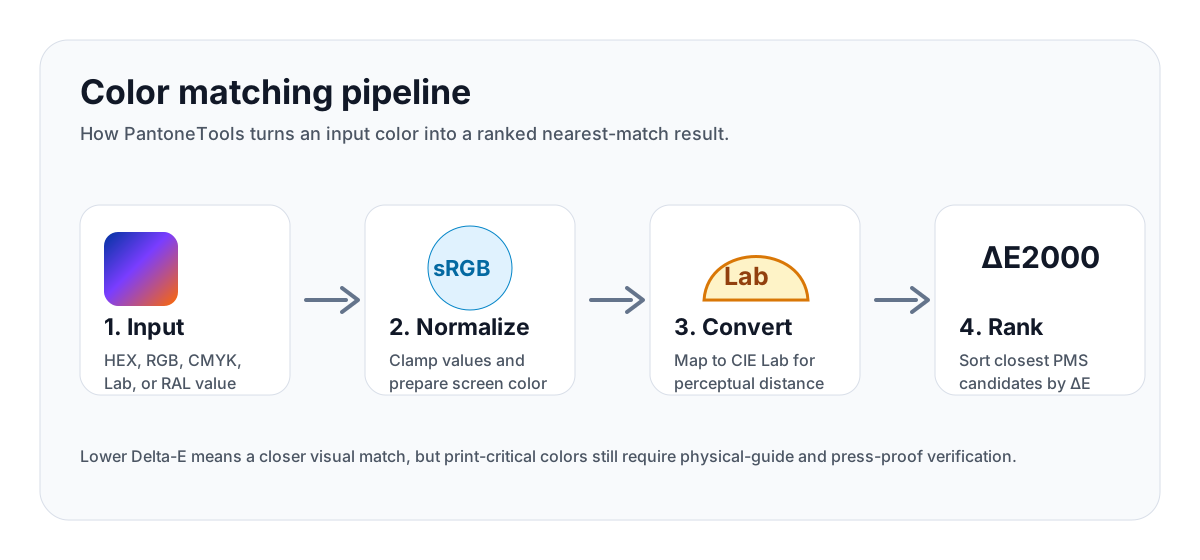
Every conversion runs the same pipeline:
- Input parsing — your color is parsed into its native model (HEX, RGB, CMYK, Lab, RAL).
- Normalization — values are clamped to valid ranges; invalid input is flagged inline.
- Conversion to CIE Lab — sRGB → linear RGB → XYZ (D65) → Lab using the standard CIE formulas.
- ΔE2000 ranking — for Pantone matching, the Lab target is compared against every reference using the CIEDE2000 formula.
- Output formatting — results are surfaced with their ΔE score and ranked ascending.
CIEDE2000 — the formula we use
We implement the full CIEDE2000 color-difference formula as published in Sharma, Wu, and Dalal (2005). This is the current industry standard for perceptual color difference, used by ISO 12647, printing standards bodies, and Adobe color tools.
The formula accounts for:
- Lightness, chroma, and hue components weighted separately
- Rotation term for blue-purple region (where ΔE2000 differs most from ΔE76)
- Compensation factors for lightness, chroma, and hue at different positions
ΔE interpretation thresholds
ΔE < 1— imperceptible to the human eye1 ≤ ΔE < 2— perceptible only on close inspection2 ≤ ΔE < 3.5— slight difference visible under direct comparison3.5 ≤ ΔE < 5— noticeable but acceptable for general production5 ≤ ΔE < 10— clearly different — review the matchΔE ≥ 10— not a usable match in the same family
How to use ΔE in real approval workflows
ΔE should guide decisions, not replace proofing. For brand-critical print work, treat the number as a triage signal: low ΔE candidates are worth proofing first; high ΔE candidates need stakeholder approval before they become fallback specs. The acceptance threshold depends on the substrate, viewing condition, color family, and how the color is used.
- Brand spot color: approve against a physical guide, drawdown, or signed press proof rather than a screen value.
- CMYK fallback: document the expected visual shift and keep the fallback tied to the printer profile used for approval.
- Digital token: verify the sRGB/HEX value, contrast behavior, and design-token naming separately from print approval.
- Packaging: repeat approval per substrate when the same brand color appears on paperboard, film, foil, or molded plastic.
Where our data comes from
Color reference data on this site is compiled from public, non-licensed sources. No proprietary or licensed digital libraries (Pantone Color Manager, X-Rite ColorCert, RAL Digital, etc.) are redistributed here. Each system is sourced as follows:
- RAL Classic sRGB values: derived from the publicly published RAL Classic colour table maintained by RAL gGmbH and the widely-mirrored Wikipedia List of RAL Classic coloursreference, cross-checked entry-by-entry for consistency between the two. RAL Design and RAL Effect systems are out of scope for this dataset.
- Pantone-style sRGB approximations: compiled from multiple community-maintained, openly-published Pantone reference tables (notably the long-standing community lookup tables circulated on color-tool repositories on GitHub) and cross-checked against independently published swatch references. These are approximations, not licensed Pantone digital values, and are intended for on-screen preview and educational conversion only. Pantone updates official references periodically; community values can drift from current Pantone Color Manager output.
- CSS named colors: sourced verbatim from the CSS Color Module Level 4 specification (W3C).
- HTML / hex / RGB / HSL / Lab math: implemented from the original CIE and IEC specifications cited below — no third-party color-data tables are involved.
If you spot a value that disagrees with an authoritative reference (RAL gGmbH, an official Pantone guide edition, or the W3C spec for CSS named colors), please report it via the contact form on the about page and we will correct it.
How conversions are computed
All matching is performed by lib/color/nearest.ts using the deltaE2000 implementation in lib/color/delta-e.ts. The algorithm is CIEDE2000 — the current ISO-recommended perceptual color-difference formula — operating in CIE Lab (D65, 2° standard observer). Concretely, the nearest-match pipeline is:
- Input sRGB → linear RGB (sRGB inverse companding).
- Linear RGB → CIE XYZ (D65 white point).
- CIE XYZ → CIE Lab.
- For every reference color in the candidate pool, compute
ΔE₀₀between the target Lab and the reference Lab via CIEDE2000 (Sharma, Wu & Dalal 2005). - Sort ascending by
ΔE₀₀; return the top N results with their numeric score and a plain-English interpretation band.
We do not use plain Euclidean RGB distance, weighted RGB, or ΔE76/ΔE94. CIEDE2000 is the only distance metric used for nearest-match ranking on this site, which is why match scores stay consistent with how humans actually perceive color difference — particularly in the blue-purple region where the older formulas misbehave. The implementation follows the canonical Sharma/Wu/Dalal reference paper, including the rotation term, the hue-rotation sign correction, and the lightness, chroma, and hue scaling coefficients.
The Pantone reference set
See Where our data comes from above for the provenance of Pantone-style sRGB values. In short: these are not official Pantone licensed digital values — they are community-published approximations from multiple cross-referenced sources.
For production-critical work, always:
- Verify against a physical Pantone guide
- View under D50 / 5000K standard lighting
- Use a spectrophotometer for ΔE measurement against printed output
- Treat our match as a starting point, not a definitive spec
Color space details
- RGB space: sRGB IEC 61966-2.1 (web standard)
- White point: D65 (6504K)
- Observer: CIE 2° standard observer
- Gamma: sRGB piecewise (linear below 0.04045, 2.4 power above)
- Chromatic adaptation: direct D65 → D65 (no adaptation applied within sRGB workflows)
CMYK conversion notes
Our CMYK conversion uses the standard subtractive formula C = (1 − R) × (1 − K) etc. This is a device-independent approximation that does not apply a printer ICC profile. For production print, your CMYK build should be converted in Photoshop or Illustrator using the appropriate ICC (FOGRA39, GRACoL 2013, etc.) for an accurate target.
ICC profiles, output conditions, and gamut clipping
PantoneTools intentionally separates browser math from press-specific color management. HEX, RGB, Lab, OKLCH, and nearest-match ΔE values are computed from sRGB under a D65 white point. Real print output should be converted through the printer's stated ICC profile and output condition: common examples include FOGRA39 or FOGRA51 for European coated offset, FOGRA47 for uncoated offset, GRACoL 2013 CRPC6 for US coated commercial work, SWOP 2013 CRPC5 for publication work, and custom press profiles supplied by the vendor.
When an sRGB or Pantone-style color sits outside the target CMYK gamut, conversion software must clip or compress that color into the printable range. Relative colorimetric intent preserves in-gamut colors and clips out-of-gamut values to the boundary; perceptual intent compresses the whole source gamut to preserve relationships in images. Neither is universally correct. Brand spots, packaging solids, and UI palette exports should document the intended output condition, rendering intent, proof type, and allowed ΔE tolerance before a color is approved.
OKLCH and APCA notes
OKLCH values are provided because they are useful for modern design systems: lightness changes in OKLCH produce more even UI ramps than naive HSL tints. The site still reports sRGB HEX as the copy-ready web value because browser and design-tool support is more predictable in production. If an OKLCH color is outside sRGB, it must be clipped before it can be represented as HEX.
Accessibility tooling uses WCAG 2.x contrast ratios as the production baseline and APCA as an additional perceptual signal. APCA is useful for judging lightness contrast in modern interfaces, but it is not currently the normative WCAG 2.1 pass/fail requirement. For launch decisions, PantoneTools treats WCAG AA as the minimum acceptance gate and uses APCA to flag pairs that deserve human review.
Review cadence and correction policy
Color-source rows carry an internal lastReviewed value so the importer can prove when a dataset row was checked. Public sitemaps intentionally omit lastmod values until production review dates can be maintained with the same rigor as the data itself. Pantone-style approximations are frozen until a better legally usable source is reviewed. Open collections are reviewed at the source level and then validated at row import time for unique codes, valid HEX, source registration, date format, and deterministic relationship precomputation.
Corrections that affect production decisions are treated as release-log changes: the source row, methodology language, and related disclaimer wording must be updated together so AI crawlers, designers, and print vendors see the same claim.
Privacy and data handling
All color computation runs client-side in your browser via JavaScript. Your color values, images, and palettes never leave your device. We do not log, store, or transmit any color data you input.
Limitations and known issues
- Out-of-gamut Pantones: highly saturated, fluorescent, and metallic Pantones cannot be perfectly represented in sRGB. Their HEX equivalents are best-effort approximations on the sRGB edge.
- Pantone editions: Pantone updates their reference values periodically. Our DB is a snapshot — values may drift from current official Pantone Color Manager output.
- RAL approximations: RAL Classic sRGB values are widely-published approximations. Industrial coating production requires physical samples.
What PantoneTools does not claim
- We do not provide licensed official Pantone digital libraries.
- We do not guarantee press output from a HEX, RGB, or CMYK value.
- We do not replace printer-supplied ICC profiles, contract proofs, or physical guide checks.
- We do not treat a nearest ΔE match as an exact color identity.
Open-source and references
- Sharma, G., Wu, W., & Dalal, E.N. (2005). The CIEDE2000 color-difference formula.
- CIE 15:2004. Colorimetry, 3rd Edition.
- IEC 61966-2-1:1999. Default RGB colour space — sRGB.
- ISO 12647-2. Process control for the production of half-tone colour separations, proof and production prints.